Skip to content

§01Features

Every feature, explained plainly.

Edgecipline turns broker screenshots into a structured trading journal, then uses your own recorded data to show what is working, what is costing you and what to work on next. Here is every current capability — what it does, how it works, the problem it addresses and how it helps.

  • 36 capabilities
  • 6 pillars
  • Forex
  • Indian stocks & F&O
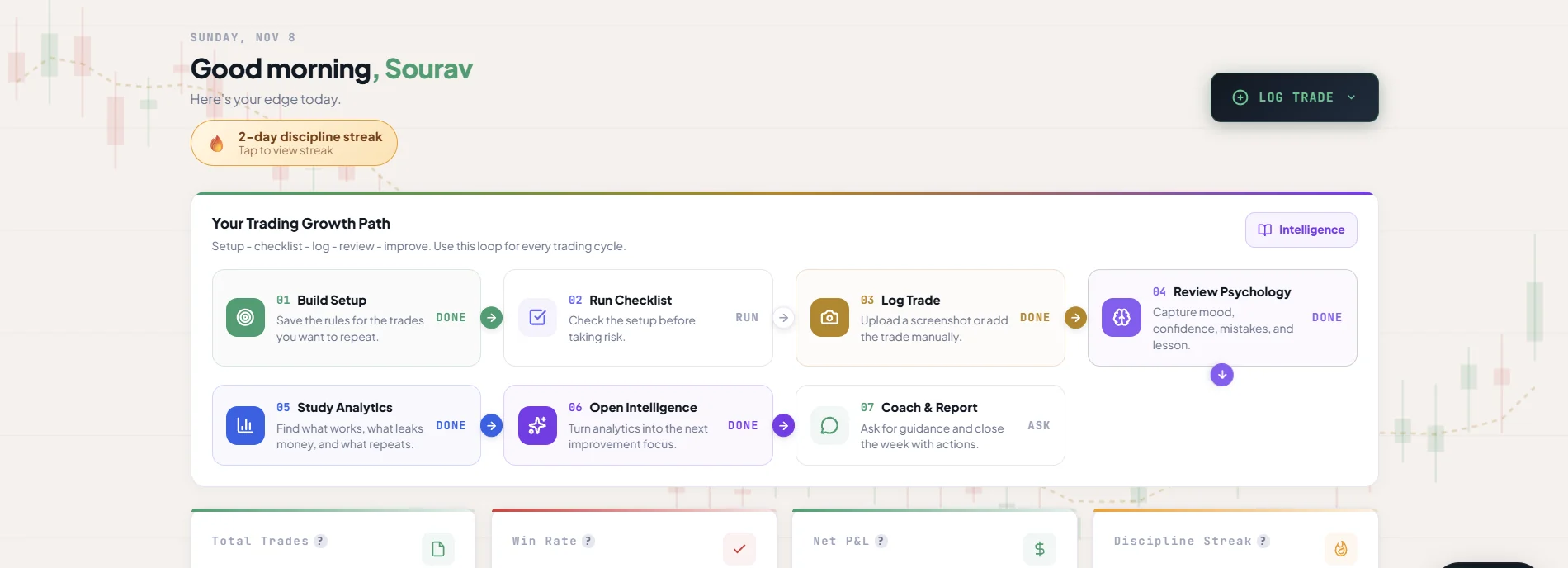
Edgecipline web dashboard: a discipline streak, the Trading Growth Path from Build Setup to Coach & Report, and KPI cards for total trades, win rate, net P&L and discipline streak.
Real Edgecipline app screen — figures belong to a test account, not to any customer.

Capture every trade

Reduce journaling friction and create structured records.

In short
Turns broker screenshots — or a quick manual entry — into complete trade records with psychology attached.
How
OCR and AI extract the fields, you review and correct them, then save.
Why it matters
Every later insight depends on a complete, consistent record.
01

Screenshot-to-trade extraction

What it does
Upload a screenshot of your broker's trade history and Edgecipline extracts the trade for you.
How it works
You preview the image and confirm it is a trade screenshot; OCR and AI then read it. Progress shows as uploading, queued, processing, completed or failed. In Indian Market mode you pick your broker first so extraction reads the right layout.
The problem it addresses
Typing every field after every trade is slow and repetitive — the main reason journals get abandoned.
How it helps
Recording a trade takes a screenshot instead of a form, so keeping a complete journal becomes realistic.
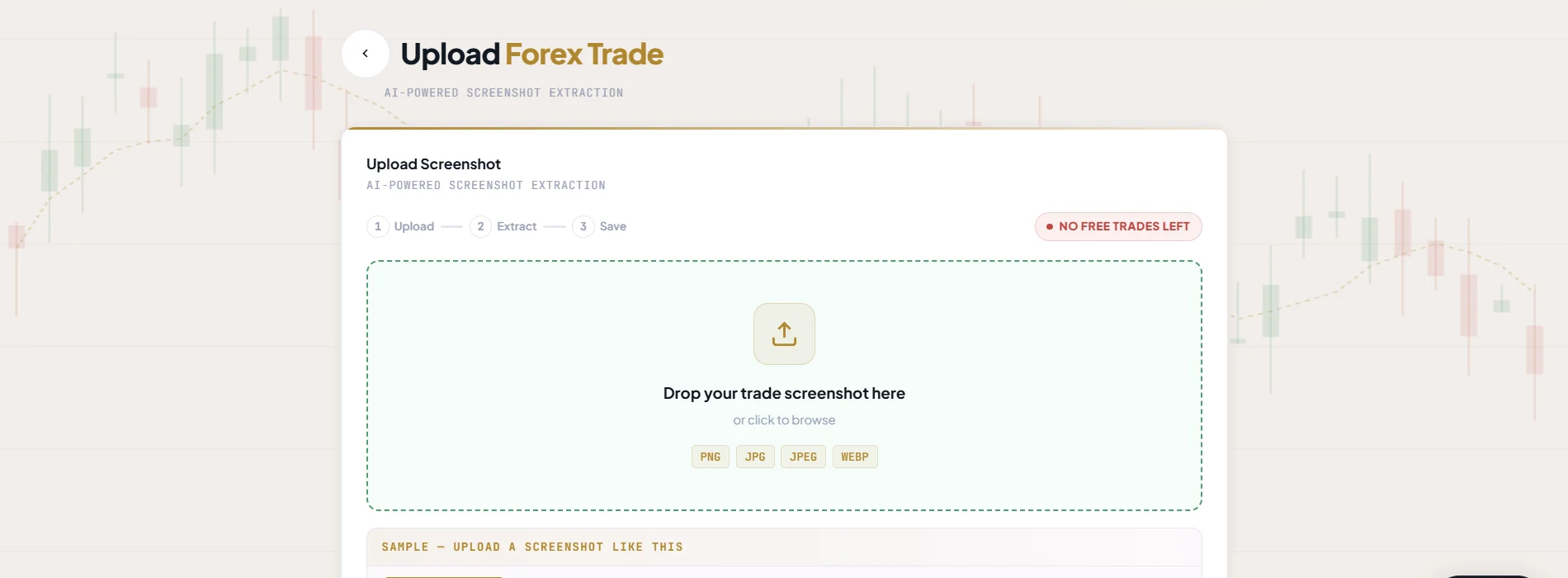
Edgecipline Upload Forex Trade screen: a three-step Upload, Extract, Save indicator and a drop zone for PNG, JPG, JPEG or WEBP trade screenshots.
Real Edgecipline app screen — figures belong to a test account, not to any customer.
02

Multi-trade extraction

What it does
One screenshot that contains several trades becomes several journal entries.
How it works
Each trade found in the image is extracted as its own record for you to review.
The problem it addresses
Active traders close many positions a day; one upload per trade would recreate the friction.
How it helps
A day of executions can be recorded from a single history screenshot.
03

Review before save

What it does
Every extracted field is shown to you, with a confidence score, before anything is saved.
How it works
Correct any field you need to, then save. Images that are not trade screenshots are rejected without saving anything or using your quota, and a failed extraction never uses quota either.
The problem it addresses
Automatic extraction is only useful if you can trust the record it produces.
How it helps
You stay in control of record accuracy — the journal holds what you confirmed.
04

Manual trade entry

What it does
Type a trade in when there is no screenshot.
How it works
The manual form records the same trade fields, psychology fields and setup checklist as an extracted trade.
The problem it addresses
Not every trade has a convenient screenshot.
How it helps
No trade has to be left out of the journal.
05

Complete trade fields

What it does
Instrument, buy/sell, size, entry, exit, stop loss, take profit, P&L, commission, swap, date, session, strategy, notes and risk:reward.
How it works
Fields are filled by extraction or by hand and stay editable after saving. Indian mode adds segment, option type, strike, expiry, lot size, brokerage, STT and taxes.
The problem it addresses
Records that only hold P&L cannot explain where results came from.
How it helps
Creates records that can later be analysed by session, strategy, instrument and risk.
06

Psychology fields

What it does
Entry basis (plan, emotion or impulsive), mood 1–5, confidence 1–5, emotion tags, mistake tag, lesson, would-retake and self-rated quality.
How it works
Captured on the trade itself, next to the numbers, so each outcome carries the decision and mindset behind it.
The problem it addresses
Most journals record what happened, not why you took the trade.
How it helps
Connects outcome to decision — the raw material for every psychology insight.
07

Trade journal management

What it does
Your trade log, newest first, with search, filters, trade detail, edit, delete and restore.
How it works
Search by symbol; filter by direction, date, result, strategy and session. Header totals cover the whole filtered period. Deleted trades can be restored, and analytics update right away.
The problem it addresses
A journal that is hard to search or correct stops being trusted.
How it helps
Keeps your trading history organised and correct.
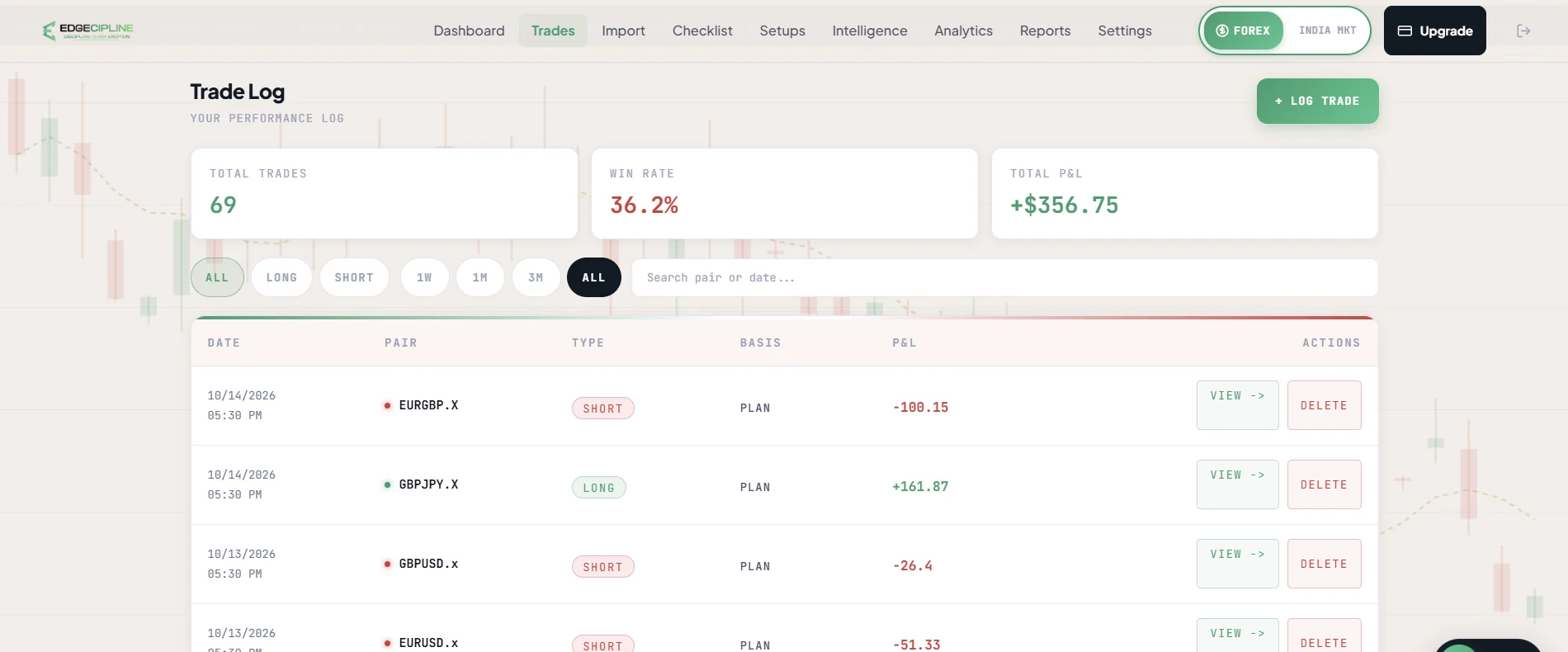
Edgecipline Trade Log: totals for trades, win rate and P&L, direction and period filters, a search box, and a table of trades with date, pair, type, entry basis and P&L.
Real Edgecipline app screen — figures belong to a test account, not to any customer.

Build your trading process

Turn a trading idea into a repeatable set of rules.

In short
Defines what qualifies as your setup, then measures how closely each trade followed it.
How
Build setups, tick rules before entering, and every trade gets a setup score.
Why it matters
Execution quality becomes something you can measure rather than remember.
01

Setup Builder

What it does
Create the setups you trade, for each market, as a list of rules.
How it works
Start from Breakout, Pullback or Reversal templates or from scratch. Up to 50 setups per market with up to 20 rules each.
The problem it addresses
A strategy that only lives in your head is easy to bend in the moment.
How it helps
Helps define, in writing, what qualifies as a trade for you.
Real app screenshot pendingSetup Builder
02

Setup reference images

What it does
Attach example chart images to a setup.
How it works
Reference images sit with the setup's rules, so the picture and the checklist are in one place.
The problem it addresses
Rules written in words can be hard to recognise on a live chart.
How it helps
Makes the intended setup easier to recognise.
03

Setup scoring

What it does
The percentage of a setup's rules you followed on a trade.
How it works
Pick a saved setup in the trade form and tick the rules you followed. Each trade keeps a copy of the rules it was scored on, so editing a setup never rewrites history.
The problem it addresses
“I mostly followed my plan” cannot be checked.
How it helps
Makes execution quality measurable, trade by trade.
04

Pre-trade checklist

What it does
Review your rules before entering and receive a confidence grade — A+, Moderate or Low.
How it works
Tick the rules that are met right now. On Android the checklist can live in a notification you tick from the shade.
The problem it addresses
Entries are often decided before the rules are checked.
How it helps
Encourages preparation before execution.
05

Psychology checklist

What it does
A flowchart and problem grid for Impulse, Fear, Revenge, Overconfidence, Overtrading and Loss Aversion.
How it works
Work through the emotional warning signs alongside your setup rules.
The problem it addresses
Emotional states rarely announce themselves while you are in them.
How it helps
Helps identify emotional warning signs before they become trades.
06

Checklist history and reminders

What it does
Every completed checklist is stored; a reminder can prompt you at a chosen time.
How it works
Set a reminder for every day or weekdays. Reminders are delivered natively on Android and iOS; on the web the setting is saved.
The problem it addresses
Habits that are not recorded are hard to keep.
How it helps
Makes your preparation habit visible over time.

Understand your performance

Use recorded trades to see where results come from.

In short
Breaks results down by instrument, strategy, session, time and risk.
How
A dashboard and analytics sections are calculated from your saved trades and refresh when trades change.
Why it matters
You compare choices against your own history instead of a feeling.
01

Dashboard

What it does
Total trades, win rate, net P&L, journal streak, equity curve, today's intelligence, an AI coach snapshot and quick actions.
How it works
The dashboard summarises your active market. Quick actions log a trade, upload a screenshot, run a checklist or open a report.
The problem it addresses
Without a summary, the journal is just a list.
How it helps
Provides a high-level view of your trading activity in one place.
Edgecipline web dashboard: a discipline streak, the Trading Growth Path from Build Setup to Coach & Report, and KPI cards for total trades, win rate, net P&L and discipline streak.
Real Edgecipline app screen — figures belong to a test account, not to any customer.
02

Performance overview

What it does
Wins, losses, profit, average trade and weekly P&L.
How it works
Calculated from your saved trades; refreshed when trades are added, edited or deleted.
The problem it addresses
Memory over-weights big wins and big losses.
How it helps
Shows overall performance as it actually is.
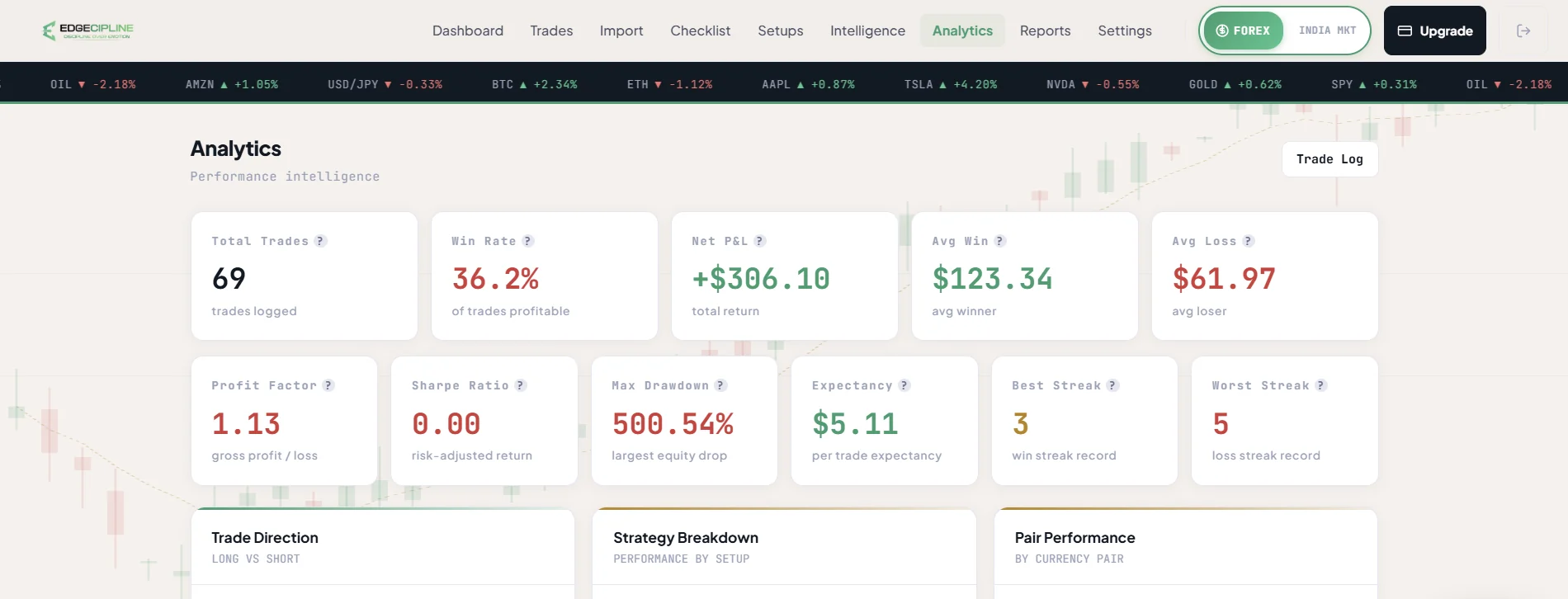
Edgecipline Analytics: KPI cards for total trades, win rate, net P&L, average win and loss, profit factor, drawdown, expectancy and streaks, followed by trade direction, strategy and pair breakdowns.
Real Edgecipline app screen — figures belong to a test account, not to any customer.
03

Instrument and strategy analysis

What it does
Best and worst pairs or instruments, and a strategy league.
How it works
Results are grouped by the instrument and strategy recorded on each trade.
The problem it addresses
Traders often keep trading what feels familiar rather than what works for them.
How it helps
Helps compare historical performance across your choices.
04

Session and time analysis

What it does
Performance by trading session and time of day.
How it works
Uses the session and time on each trade.
The problem it addresses
Performance can differ sharply between sessions without you noticing.
How it helps
Helps investigate when your performance is stronger or weaker.
05

Risk:reward, calendar P&L and drawdown

What it does
Risk:reward distribution, a calendar of P&L and drawdown.
How it works
Built from the entries, exits, stops and targets you recorded.
The problem it addresses
Risk taken is easy to forget once a trade is closed.
How it helps
Makes risk and equity changes easier to understand.
06

Mistake and pattern analytics

What it does
Your most repeated mistakes and their cost, and patterns across streak, session, day, mood and setup score.
How it works
Uses the mistake tags, psychology fields and setup scores on your trades.
The problem it addresses
The same mistake can repeat for months before it is recognised.
How it helps
Helps identify recurring areas to review.
07

Indian market cost breakdown

What it does
Indian analytics add a P&L breakdown including brokerage, STT and taxes.
How it works
Costs recorded on Indian trades are shown alongside results.
The problem it addresses
Charges can quietly change what a strategy really returns.
How it helps
Shows trading costs alongside results.

Understand your psychology

Connect behaviour and mindset with recorded outcomes.

In short
Relates mood, confidence, emotions and broken rules to the results you recorded.
How
Psychology fields on each trade feed analytics, a timeline, Psychology Cost and tilt detection.
Why it matters
The cost of a behaviour becomes visible in your own records.
01

Psychology analytics

What it does
How mood, confidence and emotions relate to your results.
How it works
Compares outcomes across the psychology fields you recorded on each trade.
The problem it addresses
Feelings about trades are vivid; their effect on results is not.
How it helps
Helps investigate behavioural influences on your trading.
02

Psychology timeline

What it does
A day-by-day and week-by-week view of your mindset, with a growth summary.
How it works
Plots the psychology data from your trades and reflections over time.
The problem it addresses
Changes in mindset are hard to see from inside them.
How it helps
Makes changes in mindset easier to review.
03

Psychology Cost

What it does
Tracks the money associated with FOMO, revenge, fear, greed and broken rules in your recorded trades.
How it works
Adds up the P&L lost on trades tagged with each emotion, mistake or rule violation, and shows a 0–100 cost score with your top three leaks. It unlocks at about 10 tagged trades.
The problem it addresses
“What do my emotions cost me?” usually has no answer.
How it helps
Makes the impact of behaviour visible in your own recorded data.
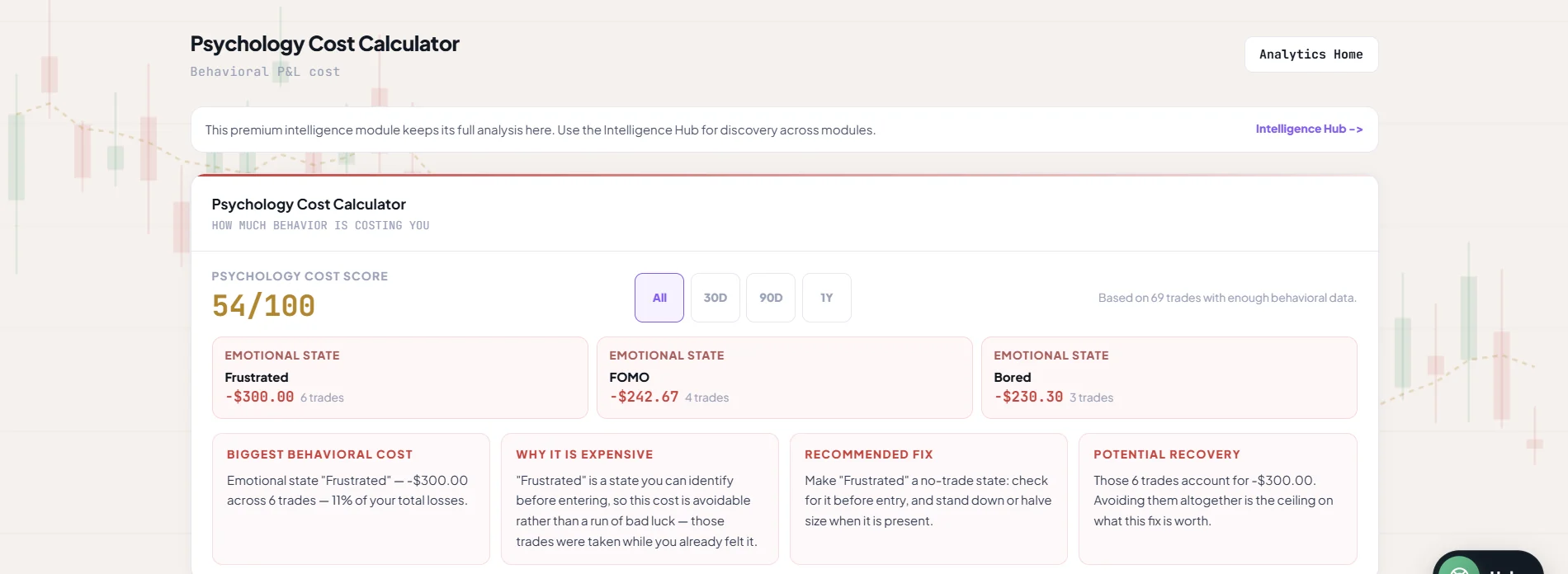
Edgecipline Psychology Cost Calculator: a psychology cost score, the emotional states with the largest recorded cost and their trade counts, and cards for biggest behavioural cost, why it is expensive, recommended fix and potential recovery.
Real Edgecipline app screen — figures belong to a test account, not to any customer.
04

Revenge and tilt detection

What it does
Flags revenge-trading and tilt patterns.
How it works
Tilt is flagged after three losses in a row; revenge trading after three losses within four hours. A smart coach alert can warn you when it happens.
The problem it addresses
Tilt is hardest to recognise while it is happening.
How it helps
Makes potentially destructive patterns easier to notice.
05

Self-awareness score

What it does
Compares how you rated your own trades with how the system rated them.
How it works
Your Great / Average / Poor rating on each trade is compared with a system score built from setup adherence, entry basis, emotion, would-retake and confidence. It unlocks at about 15 rated trades.
The problem it addresses
Most traders over- or under-rate their own execution.
How it helps
Encourages more objective self-review.
06

Discipline score and trend

What it does
A discipline score, its trend and your strongest habit, for both markets.
How it works
Shown on the Discipline page for each market, alongside the trend over time.
The problem it addresses
Discipline is usually judged by P&L, which mixes luck with process.
How it helps
Helps you monitor consistency in process, not just outcome.

Get personalised coaching

Turn the journal into answers and improvement priorities.

In short
Organises your journal into answers, ranked insights, a Trading DNA report and a coach you can question.
How
Insights come from your recorded data. Where there is not enough yet, a module says how much more it needs.
Why it matters
The journal becomes easier to interpret — and every answer ends in an action.
01

Intelligence Hub

What it does
Five questions, answered from your journal: What makes me money? What costs me money? What should I improve? How am I evolving? What should I do now?
How it works
Each answer is built from your trades, analytics and psychology data. Modules without enough data show a locked state that says what is needed.
The problem it addresses
Analytics pages answer many questions — but not always the one you have.
How it helps
Makes the journal easier to interpret.
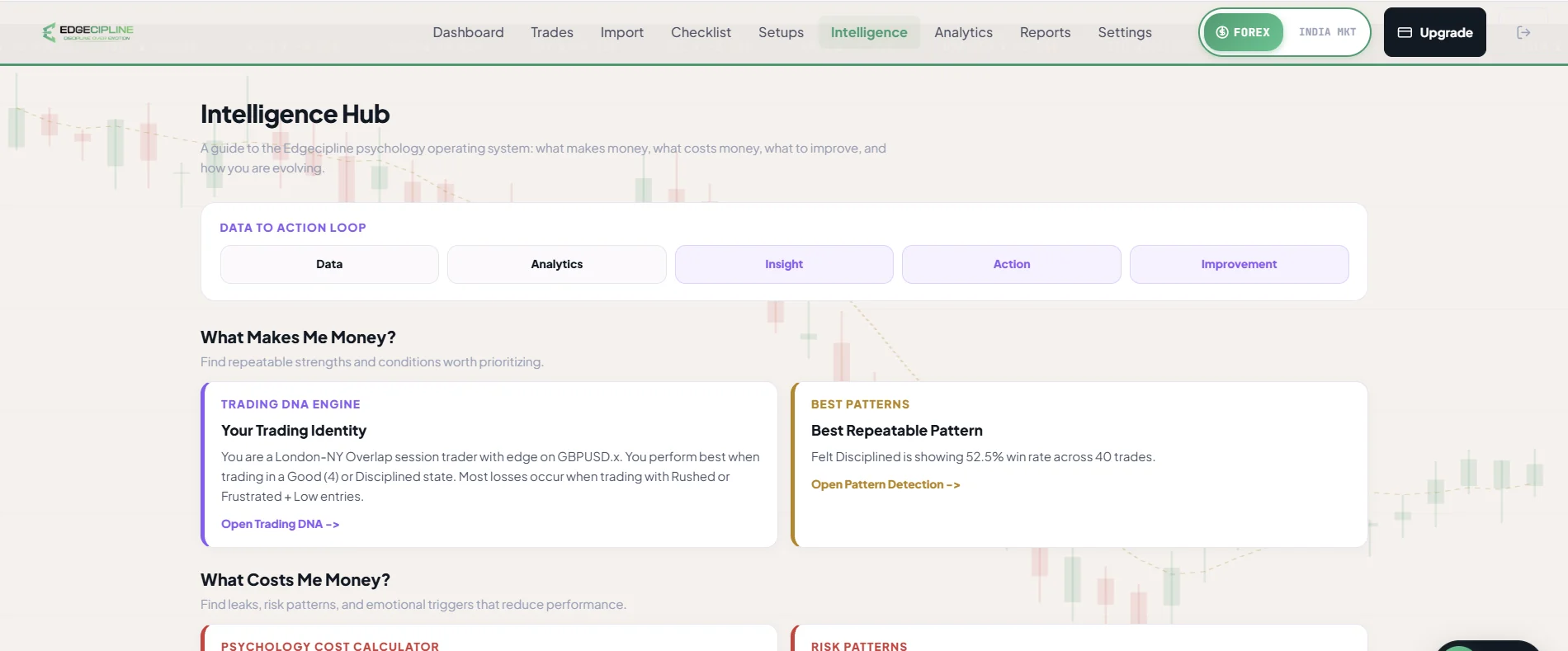
Edgecipline Intelligence Hub: a Data, Analytics, Insight, Action, Improvement loop, then What Makes Me Money and What Costs Me Money sections with Trading DNA, best pattern, psychology cost and risk pattern cards.
Real Edgecipline app screen — figures belong to a test account, not to any customer.
02

AI Coach insights feed

What it does
5–15 ranked insights about your trading.
How it works
Rule-based generators read your recorded trades and rank insights by impact. Insights based on fewer than five trades are filtered out — a mix of problems and strengths, with no duplicate topics.
The problem it addresses
It is hard to know which of many numbers matters most.
How it helps
Surfaces notable patterns and possible next actions.
03

Trading DNA report

What it does
An AI report of your strengths, weaknesses, best setup and session, and risk style.
How it works
Choose a 30, 90 or 365-day window. It is generated in the background, can be regenerated once every 24 hours, and includes a quarterly comparison. You can share a Trading DNA card.
The problem it addresses
Your trading identity is spread across hundreds of records.
How it helps
Helps you understand your strengths, weaknesses and risk style in one place.
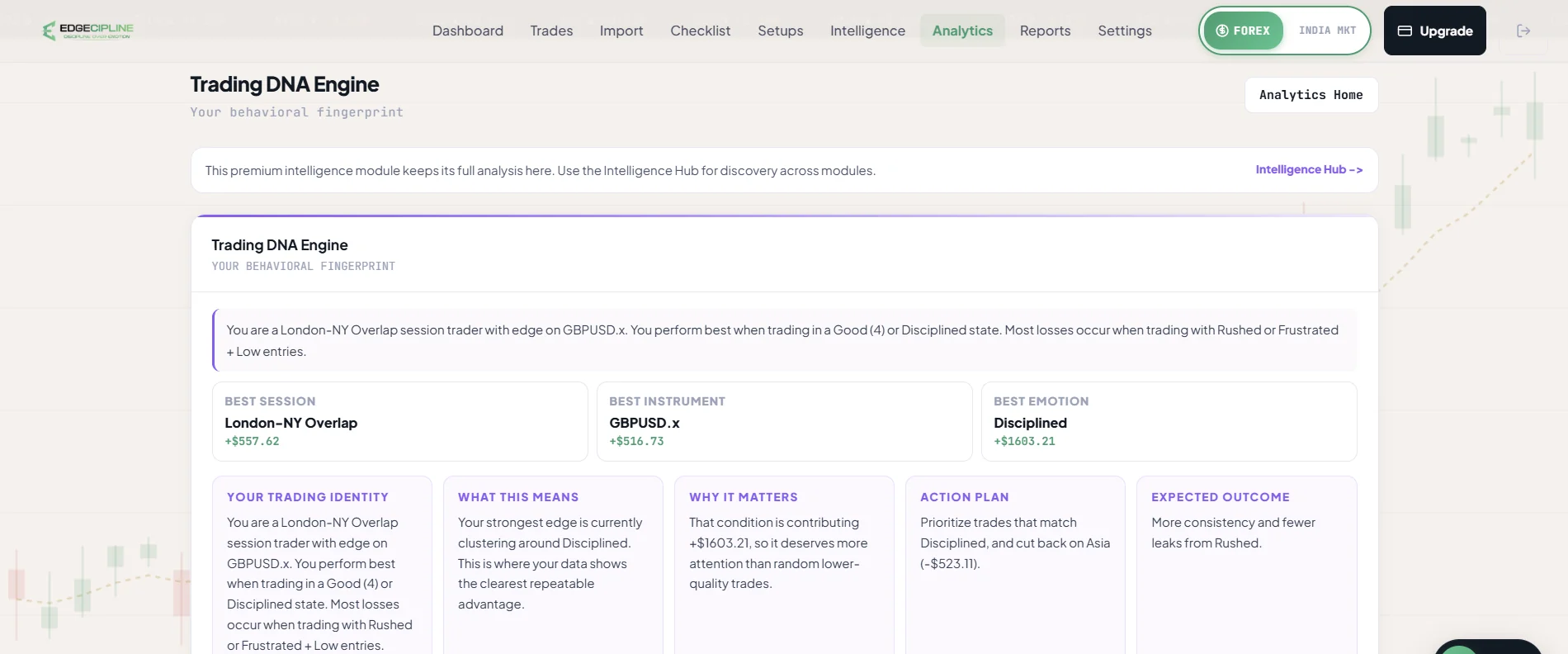
Edgecipline Trading DNA Engine: a behavioural summary, best session, instrument and emotion, and cards for trading identity, what it means, why it matters, action plan and expected outcome.
Real Edgecipline app screen — figures belong to a test account, not to any customer.
04

AI Coach Chat

What it does
Ask questions about your own trading and get streaming answers.
How it works
Answers are grounded in your last 20 trades, streaks, recent reflections, latest weekly report, analytics, psychology and DNA. Start from an insight, a trade, a reflection or a report — or ask freely. Free plan: 5 questions per week; a question is not counted if the answer fails.
The problem it addresses
Generic trading advice does not know your trades.
How it helps
Lets you ask questions about your own recorded trading. Answers never invent numbers, never give signals, and end with one concrete action.
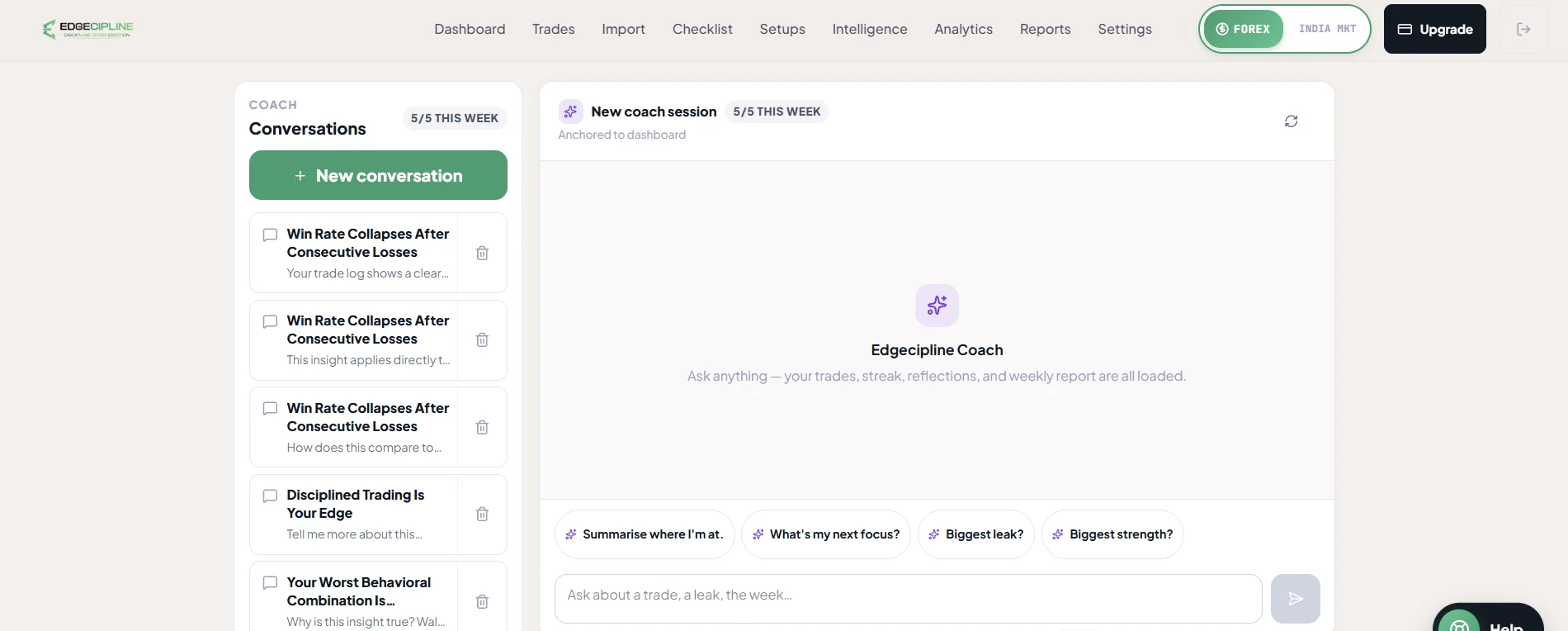
Edgecipline AI Coach: a list of saved coach conversations, a 5 of 5 weekly question counter, quick prompts such as Biggest leak and Biggest strength, and a message box.
Real Edgecipline app screen — figures belong to a test account, not to any customer.

Build lasting discipline

Make review and consistency part of the trading routine.

In short
Turns improvement into small daily and weekly routines you can track.
How
Missions, streaks, a morning focus, an evening check-in and a weekly report keep useful habits visible.
Why it matters
Consistency in process is easier to build when it is measured.
01

Missions

What it does
Goals across risk, discipline, psychology, journaling and strategy — for example Stop Loss on Every Trade, No Revenge Trades or a 14-day journal streak.
How it works
Up to three missions at a time. Progress updates automatically from your trades, reflections and weekly reports; recommendations target your weakest area. Some missions require Pro.
The problem it addresses
“Be more disciplined” is not something you can practise.
How it helps
Turns improvement into specific, trackable behaviours.
02

Journal, checklist and rule streaks

What it does
Three streaks: logging a trade or “No Trade Today”; using the checklist on trading days; and consecutive trades at or above your setup-score threshold.
How it works
Milestones run from 3 to 365. A streak of 7 or more that misses exactly one day can be recovered, at most once every 30 days. Reminders never shame you.
The problem it addresses
Win streaks reward outcomes, not process.
How it helps
Rewards consistent journaling, preparation and rule adherence.
03

Evening reflection

What it does
A 30-second check-in: did you follow your plan, your mood and confidence, would you repeat the day, and one improvement.
How it works
An AI line responds to your note. It can be skipped.
The problem it addresses
Days end without the lesson being written down.
How it helps
Encourages a short review of every trading day.
04

Weekly report

What it does
A performance breakdown, a psychology read and a next-week checklist.
How it works
Generated each week, or on demand. Any placeholder AI output is visibly labelled.
The problem it addresses
Weekly reviews are easy to postpone indefinitely.
How it helps
Creates a structured weekly review.
05

Morning Mentor

What it does
A 07:00 IST message that sets a focus for the day.
How it works
Delivered as a notification and kept in your inbox.
The problem it addresses
Sessions often start without a behavioural priority.
How it helps
Helps you start the day with one thing to focus on.
06

Notifications and reminders

What it does
Session, reflection, streak, weekly report, mentor and mission reminders, with an inbox and preferences.
How it works
Turn each category on or off, with quiet hours (22:00–07:00 IST by default). Smart coach alerts flag things like a trade without a stop loss, a low setup score or a repeated mistake. Push on Android and iOS.
The problem it addresses
Good routines are forgotten on busy days.
How it helps
Keeps useful routines visible.

§03Interactive product tour

Walk through the app. Journal to Trading DNA.

Real screens from the Edgecipline app, in its own light appearance.

app/trades
Edgecipline Trade Log: totals for trades, win rate and P&L, direction and period filters, a search box, and a table of trades with date, pair, type, entry basis and P&L.
Real Edgecipline app screen — figures belong to a test account, not to any customer.

Journal

Every trade, newest first, with server-side search and filters and totals for the whole filtered period.

  1. Search by symbol; filter by direction, date, result, strategy and session.
  2. Header totals cover the whole filtered period, not just loaded rows.
  3. Open any trade for every field, the screenshot, psychology and checklist.
  4. Edit, soft-delete and restore — analytics update right away.

§04Supporting capabilities

The parts that keep the product usable.

Not the main story — but present in the app on web, Android and iOS.

  1. 01Guided onboarding

    Market, trading style, a seeded first setup and a first trade — resumable, skippable and replayable.

  2. 02Settings and profile

    Account, market, reminders and subscription in one place.

  3. 03Help and support

    A help centre, a support assistant that finds help articles, support tickets, WhatsApp contact and feedback.

  4. 04Account deletion

    Permanently delete your account and all its data from inside the app.

Analytics and coaching are educational and based on your own recorded data. Insights depend on having enough recorded trades — locked modules say how much more they need. See pricing for Free and Pro limits.

§05Get launch updates

Be there when Edgecipline launches.

The Edgecipline web app is ready. Android testing is underway with a limited group of users, and the iOS app is in development. The official public launch across all platforms will follow once iOS is ready.

  • An email when the public launch happens.
  • Product and plan updates around launch.
  • Only your email is required — name, phone and experience are optional. See the Privacy Policy.

Free to join, no card required. We email you about the launch and product updates — nothing else.

Get launch updates.

Public launch is coming soon. Leave your email and we’ll tell you when Edgecipline launches, plus product and plan updates. Only your email is required.

Free to join, no card required. We email you about the launch and product updates — nothing else.