
§01How it works
From one screenshot to next week’s plan.
Edgecipline removes the friction from journaling, then turns the journal into coaching about your behaviour — never predictions about the market. Six steps, end to end.
Just screenshot your broker. Review it. Save a structured trade.
Behaviour traceA journal becomes a pattern
Not a signal. Evidence from your own journal.
§02The workflow
Capture, review, save, analyse, coach, improve.
- Step 01 · Capture
Upload a screenshot — or type the trade in
Pick a screenshot of your broker's trade history, preview it and confirm it is a trade screenshot. In Indian Market mode you choose your broker first, so extraction reads the right layout. No screenshot? Manual entry records the same fields.
- Your quota is checked before any extraction runs.
- Images that are not trade screenshots are rejected without saving anything or using quota.
- Progress shows as uploading, queued, processing, then completed or failed.
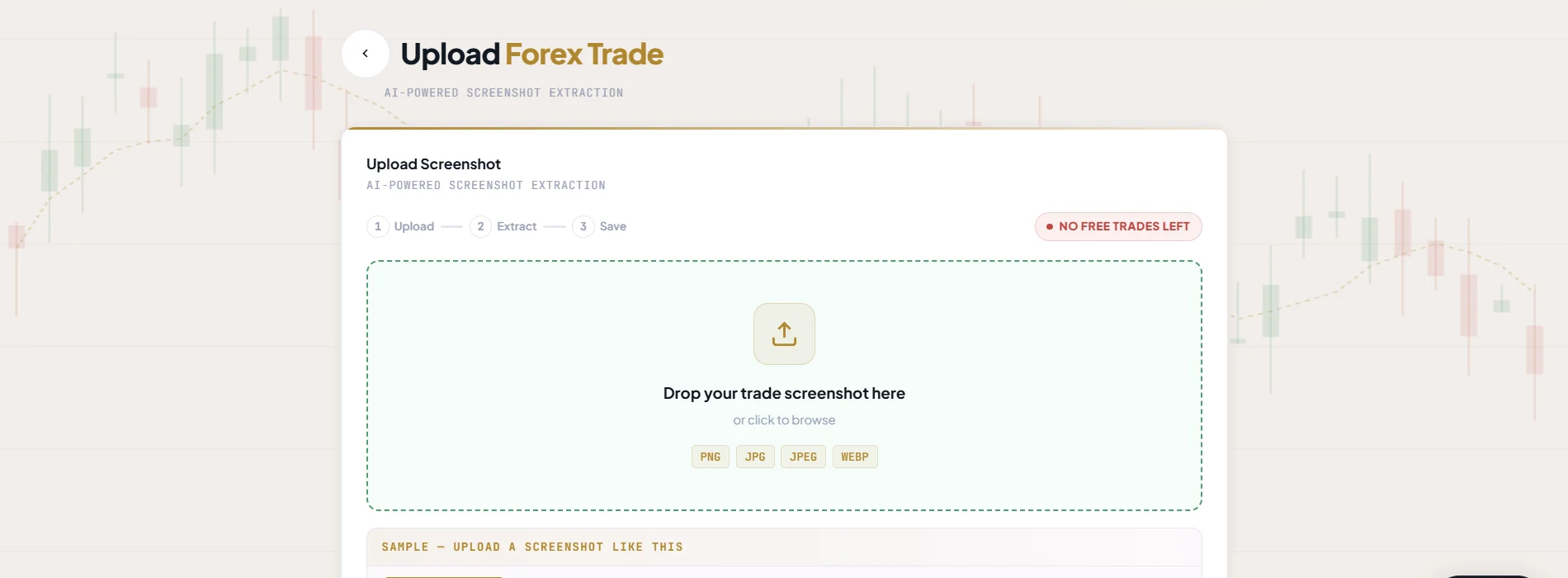
Real Edgecipline app screen — figures belong to a test account, not to any customer. - Step 02 · Review
Check every extracted field
OCR and AI read the image. A screenshot with several trades becomes several entries. Each field is shown with a confidence score, and you correct anything before it is saved.
- You stay in control of the record — nothing is saved until you confirm.
- A failed extraction never uses quota, and you can retry.
- If extraction takes longer than expected, the app says so and offers a retry.
Review before saveWhat you see before saving
- Every extracted field
- Shown before saving
- Confidence score
- Shown with the extraction
- Corrections
- Edit any field first
- Several trades in one image
- Become several entries
- Not a trade screenshot
- Rejected, no quota used
- Extraction fails
- No quota used, retry
From the screenshot-upload flow - Step 03 · Save
Save a structured trade, with the why behind it
Add psychology details — entry basis, mood, confidence, emotion tags, mistake and lesson — and tick the setup rules you followed to get a setup score. The trade joins your journal.
- Forex and Indian journals are kept fully separate.
- Retried saves never create duplicates.
- Edit, delete and restore at any time; analytics update right away.
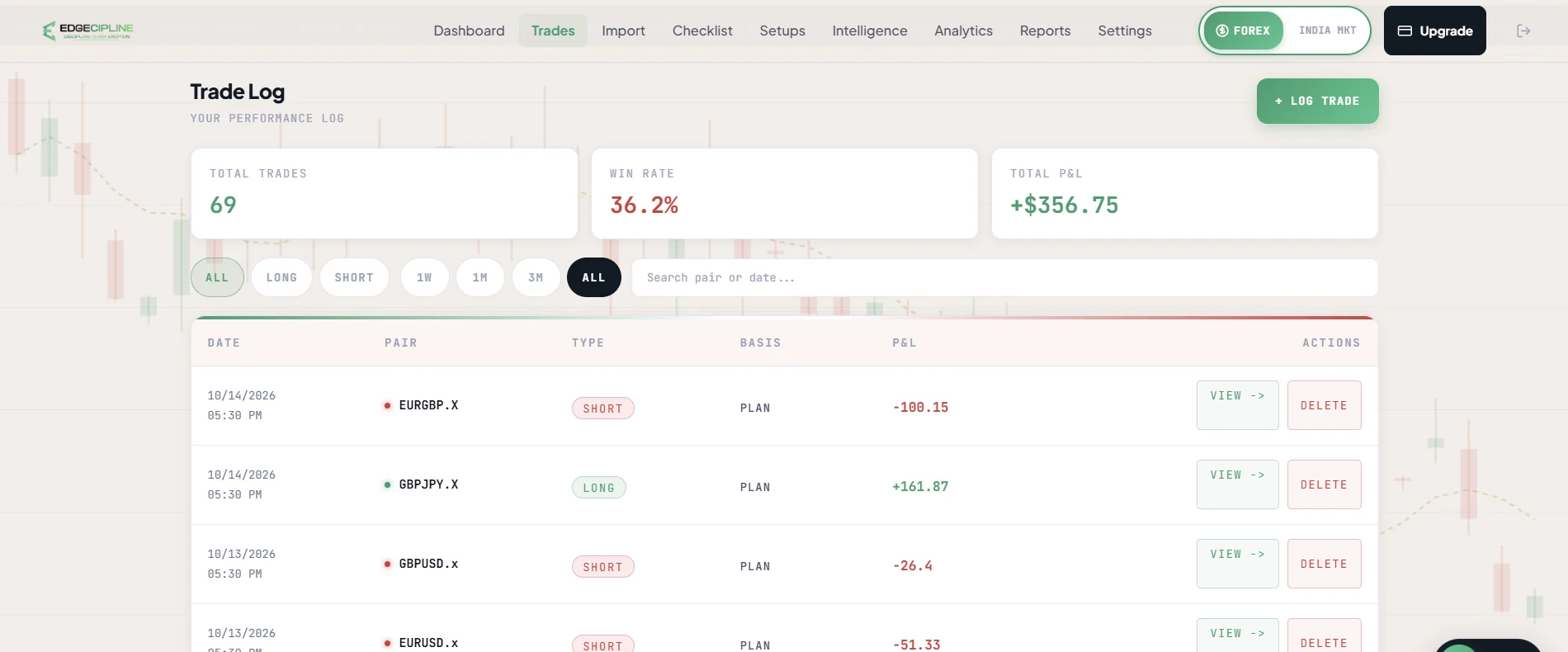
Real Edgecipline app screen — figures belong to a test account, not to any customer. - Step 04 · Analyse
See where results come from
The dashboard and analytics break your results down by instrument, strategy, session, time, risk and psychology — all calculated from the trades you recorded.
- Performance overview, strategy league, session and time, risk:reward, calendar P&L and drawdown.
- Psychology Cost: the P&L lost on trades tagged FOMO, revenge, fear, greed or broken rules.
- Indian mode adds a brokerage, STT and tax breakdown.
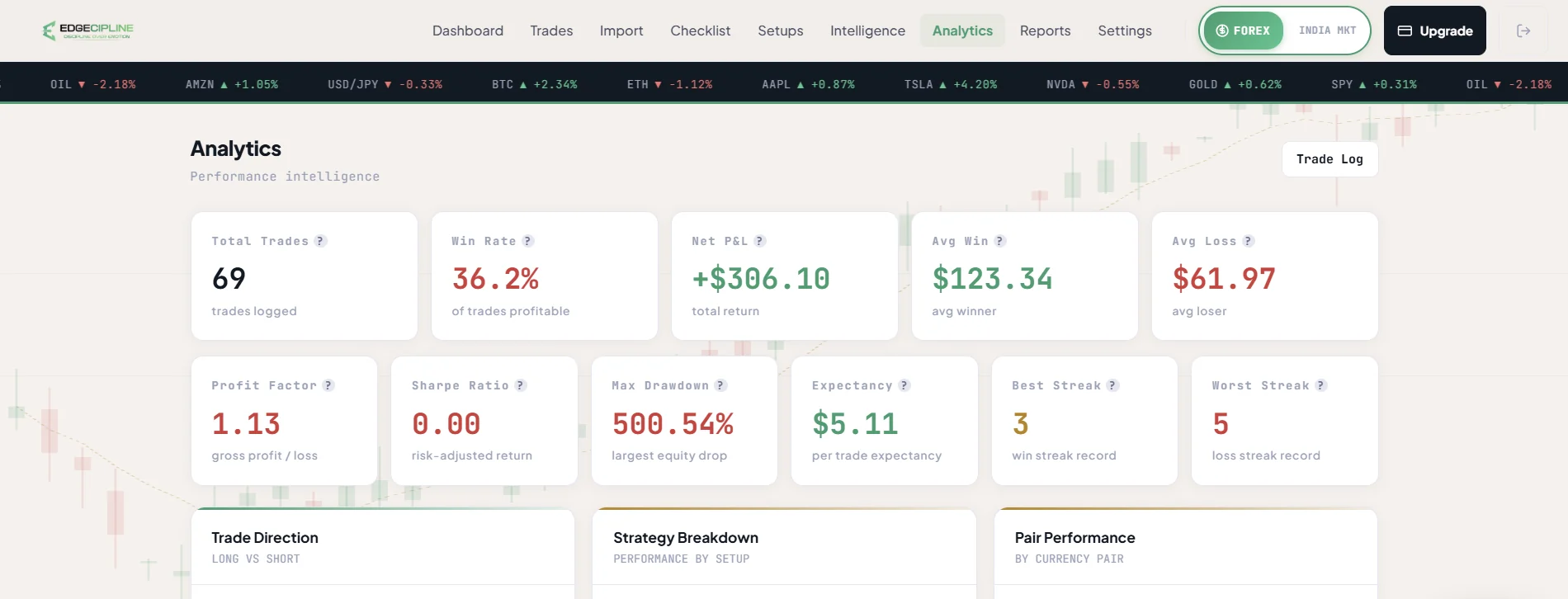
Real Edgecipline app screen — figures belong to a test account, not to any customer. - Step 05 · Coach
Ask what your data means
The Intelligence Hub answers five questions from your journal, the AI Coach feed ranks what matters, Trading DNA summarises your trading profile, and AI Coach Chat answers your own questions about your own trades.
- Coaching never gives signals, predictions or price targets.
- It never invents numbers — and every answer ends with one concrete action.
- Modules without enough data say how much more they need.
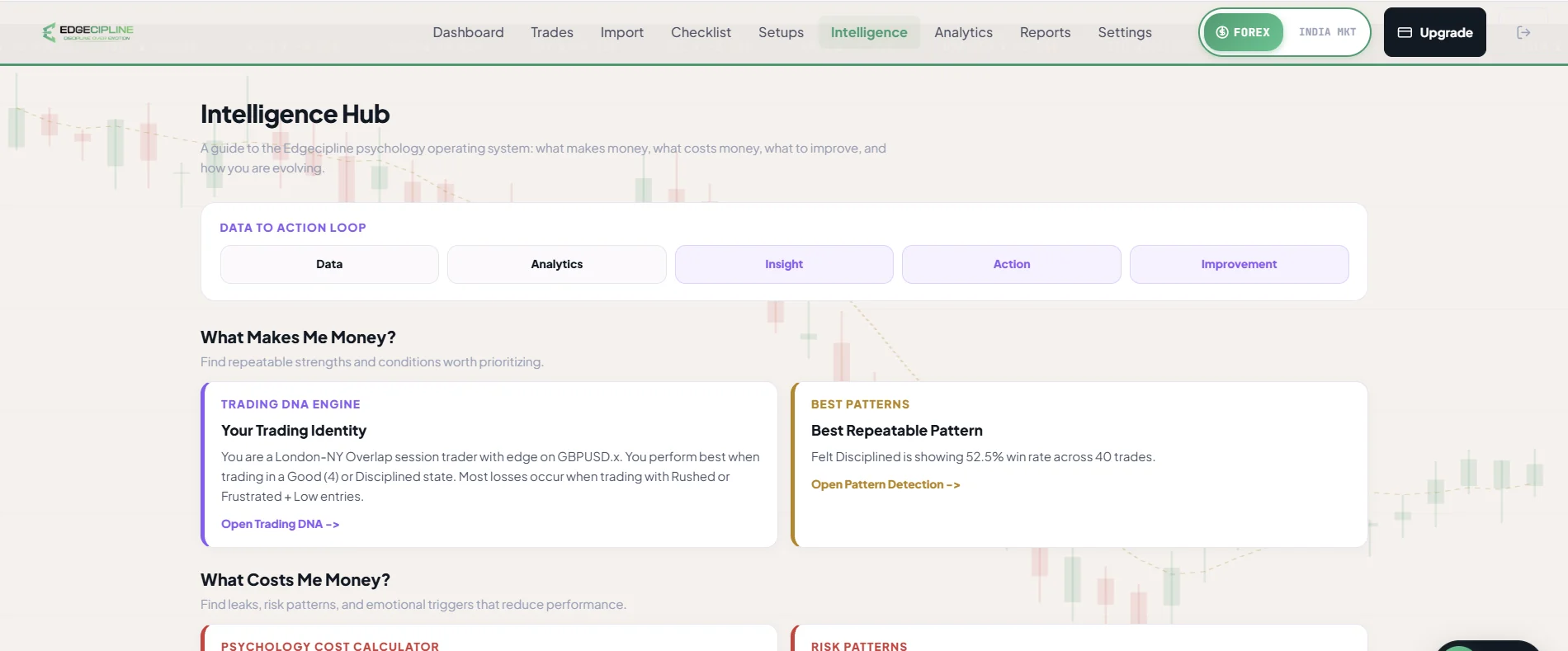
Real Edgecipline app screen — figures belong to a test account, not to any customer. - Step 06 · Improve
Work on one thing at a time
Pick a mission for your weakest area, run the pre-trade checklist, keep your streaks and close each day with a 30-second reflection. The weekly report turns the week into a next-week checklist.
- Up to three active missions; progress updates automatically.
- Journal, checklist and rule streaks reward process, not P&L.
- Broken streaks are treated as information, never as failure.
Your routineDaily and weekly loop
- 07:00Morning MentorSets the focus for the day.
- Pre-tradeChecklistTick your setup rules; get a confidence grade.
- Each tradeJournal + rule streakLog it, or record “No Trade Today”.
- EveningReflectionA short check-in on plan, mood and one improvement.
- WeeklyWeekly reportPerformance, psychology and a next-week checklist.
§03The daily and weekly loop
A routine small enough to keep.
Review is easier to sustain as a light, regular habit than as an occasional deep dive. These are the loops the app is built around.
Every trading day
- 07:00 ISTMorning MentorA message that sets one focus for the day.
- Before tradingPre-trade checklistTick your setup rules; get an A+, Moderate or Low grade.
- After each tradeLog itScreenshot or manual entry — or tap “No Trade Today”.
- EveningReflectionPlan followed? Mood, confidence, one improvement. About 30 seconds.
Every week
- 01Weekly report
Performance breakdown, psychology read and a next-week checklist.
- 02Pick a mission
A specific behaviour for your weakest area, tracked automatically.
- 03Act on the priority
Start next week with the priority action from your coach snapshot.
§04Insights unlock with data
No guessing. Insights appear when your data can support them.
Edgecipline shows an insight only when enough data exists. Until then, each module shows a locked state that says what it still needs. The thresholds are approximate.
| Question | Built from | Unlocks at |
|---|---|---|
| What makes me money? | Trading DNA and patterns | about 20 trades |
| What costs me money? | Psychology Cost | about 10 tagged trades |
| What should I improve? | Self-awareness and discipline | about 15 rated trades |
| How am I evolving? | Psychology timeline | about 2 weeks of data |
| What should I do now? | AI Coach feed | about 10 trades |
Pattern confidence also grows with sample size: groups with fewer than five trades are hidden rather than reported.
§05Honest by design
When something fails, you are not charged for it.
Failures say what went wrong, never cost you quota, and always offer a retry.
- A failed extraction is free — If extraction fails, nothing is saved and your free-trade quota is untouched. Retry when you are ready.
- A failed coach answer is refunded — If the AI fails to answer, the question is not counted against your weekly quota, and you can retry in place.
- Errors in plain language — Upstream AI errors are translated into plain messages that say what failed — never raw provider text.
- No guessing with thin data — An insight that needs more trades shows a locked state with what is needed, instead of inventing a pattern.
Edgecipline does not connect to your broker account. Trades come only from screenshots you upload or entries you type. See the Privacy Policy.
§06Get launch updates
Be there when Edgecipline launches.
The Edgecipline web app is ready. Android testing is underway with a limited group of users, and the iOS app is in development. The official public launch across all platforms will follow once iOS is ready.
- An email when the public launch happens.
- Product and plan updates around launch.
- Only your email is required — name, phone and experience are optional. See the Privacy Policy.